Additional FAQ
What is Esther's Art Lab?
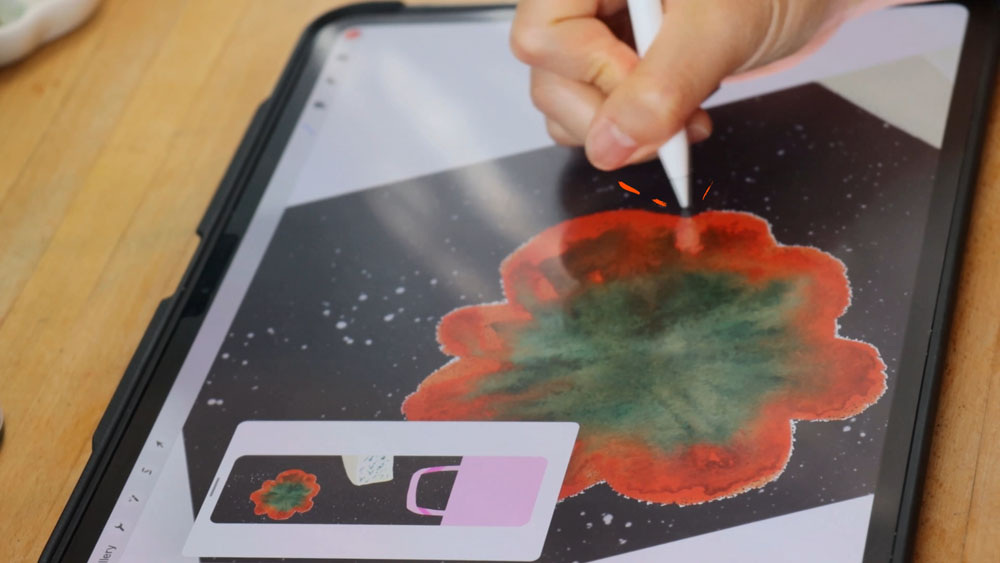
Esther's Art Lab is an 11-hour comprehensive illustration course that teaches you how to create professional mixed media artwork using both traditional and digital tools. You'll learn a repeatable workflow that moves from paper-based traditional materials through Procreate, Photoshop, and Illustrator, while preserving the authentic texture and energy of hand-drawn work.
Who is this mixed media illustration course for?
This course is designed for:
- Traditional artists who want to digitize their work without losing its soul
- Digital illustrators seeking to add organic texture and warmth to their artwork
- Surface pattern designers creating portfolio pieces for licensing or client work
- Freelance illustrators who need professional digital workflows for commercial projects
- Advanced beginners and intermediate artists comfortable making art but wanting structured workflow guidance
Is this course beginner-friendly?
The course works best for advanced beginners and intermediate artists. You don't need to be technically advanced, but you should feel comfortable creating art and following guided workflows. We start with fundamentals and build from there, explaining both the "what" and the "why" behind each technique.
What software do I need for this course?
The course teaches workflows across three main programs:
- Procreate (iPad app - optional but recommended)
- Adobe Photoshop (for scan cleanup and compositing)
- Adobe Illustrator (for vector work and pattern design)
You can follow along with one program and still learn the complete workflow logic. The course shows how tools connect, so you can grow into using multiple programs over time.
Can I take this course if I only use Procreate?
Yes, absolutely. You'll learn digitizing techniques, cleanup methods, and finishing skills that work in Procreate. The course teaches tool-agnostic principles first, then shows program-specific applications. Even if you only use Procreate, you'll discover how to keep traditional texture looking authentic in your digital finals.
Can I take this course without an iPad or Procreate?
Yes. You can complete all projects using Photoshop and Illustrator alone. Procreate is optional. The workflows are designed to be flexible—choose the tools that match your setup and creative goals.
Do I have to be good at all three programs to benefit from this course?
Not at all. The course teaches you what each program does best and when to use each one. You can start with your strongest tool and gradually expand into others as your confidence grows. Many students begin comfortable in just one program and finish with a clear understanding of all three.
What's the difference between Procreate, Photoshop, and Illustrator?
This is exactly what we address in the course. In simple terms:
- Procreate: Best for natural brushwork, sketching, and maintaining organic texture
- Photoshop: Ideal for scan cleanup, photo manipulation, and raster-based illustration
- Illustrator: Perfect for vector artwork, scalable designs, and pattern creation
The course teaches you to choose tools based on your project needs, not guesswork.
Do you teach Affinity Designer or other alternatives to Adobe?
While the course focuses on industry-standard Adobe tools and Procreate, the workflow principles apply across platforms. Many techniques work similarly in Affinity Designer or other programs—you'll learn the underlying concepts that transfer between tools.
What traditional art supplies do I need?
You can use whatever traditional materials you already have. The course isn't about expensive supplies—it's about method and workflow. Students work with everything from basic pencils and watercolors to markers and colored pencils. Use what feels natural to your creative process.
Do I need a professional scanner?
No. You can use a flatbed scanner or your phone camera. The course covers both approaches, teaching you how to capture clean, workable digital files either way. We focus on optimizing whatever scanning method you have access to.
What DPI should I scan artwork at for print?
For print work, scan at 300 DPI minimum. Many professional illustrators scan at 600 DPI for extra detail and flexibility when resizing. The course teaches best practices for different output needs—from web graphics to large-format prints.
My scans look gray, dull, or washed out. How do I fix that?
This is one of the most common frustrations, and we address it directly in the course. You'll learn scan cleanup techniques that brighten whites, protect highlights, maintain true colors, and preserve texture—all without making your artwork look over-processed or artificial.
How do I remove the paper background without destroying the watercolor texture?
Great question—this stumps so many artists. You'll learn multiple methods for removing distracting backgrounds while keeping soft edges, watercolor bloom, pencil grain, and that essential handmade quality. We teach approaches that work for different traditional media, from watercolor to colored pencil.
How do I keep watercolor texture when digitizing artwork?
Preserving watercolor texture is a core focus. You'll learn how to maintain luminosity, paper grain, and natural variation during the cleanup and compositing process. The goal is making it still look like watercolor, not a digital filter trying to imitate watercolor.
My digital illustrations look flat compared to my traditional work. Will this help?
Yes. You'll learn specific techniques to keep depth, texture, and natural variation when moving from paper to pixels. We address why digital work often looks flat and how to prevent it through smart scanning, selective enhancement, and intentional texture preservation.
Does this course teach compositing and layering scanned elements?
Absolutely. You'll learn how to build cohesive illustrations using scanned textures and traditional elements alongside digital painting and refinements. One entire project focuses on combining multiple traditional elements into a unified digital composition.
Can I use this workflow for surface pattern design?
Yes. The workflow is specifically designed to support pattern design. You'll learn how to separate motifs, clean edges, and organize assets so you can reuse them for pattern repeats, collections, and product designs. One course project is pattern-focused.
Will this help me create files ready for art licensing?
Definitely. The course takes a production-minded approach. You learn professional digitizing methods, polished finishing techniques, and how to present work that feels client-ready. We focus on creating files that meet industry standards for licensing and commercial use.
Is this useful for packaging design workflows?
Yes. One of the three course projects is packaging-based, so you'll practice a real-world deliverable workflow from concept through finished files. You'll understand how to adapt your illustration process for commercial packaging requirements.
How do I separate individual elements and motifs from traditional artwork?
You'll learn multiple selection and extraction methods that work for different media types. Whether you're working with watercolor flowers, hand-lettered text, or decorative elements, you'll discover clean techniques for isolating elements while maintaining their authentic edges and texture.
What if I start traditionally but need to make digital changes?
This is where the hybrid workflow shines. You'll learn how to scan traditional work, bring it into digital programs, make edits and adjustments, then finish it professionally—all while keeping that hand-drawn energy. We teach methods for digital cleanup that enhance rather than erase your traditional qualities.
Is this course good for building a professional illustration portfolio?
Yes. The three course projects are designed to become portfolio pieces that demonstrate both finished artwork and your creative process. You'll create work that shows traditional skills, digital finishing, and professional presentation—all qualities art directors and clients look for.
Is this relevant for picture book illustrators?
Very relevant, especially if you want to keep traditional warmth and texture while delivering clean digital files and consistent finishes. Picture book publishers often want the charm of traditional media with the flexibility of digital delivery—exactly what this workflow provides.
Does the course help with developing a consistent illustration style?
It supports style development through process. You'll build a visual library, make intentional tool choices, and complete projects that reflect your personal artistic voice. Rather than copying a style, you'll discover methods for expressing your unique vision consistently across projects.
Will this help me work faster and more efficiently?
Yes. You'll learn streamlined workflows that eliminate guesswork and reduce time spent on technical problems. Understanding what each tool does best—and when to use which one—dramatically speeds up your process. Many students report cutting their project time in half after implementing these workflows.
How does this prepare me for client work and freelance illustration?
The course uses real-world creative briefs for all three projects. You'll practice working from actual client-style requirements, making professional decisions about style, technique, and delivery. This approach bridges the gap between personal art and commercial illustration work.
How long is the course?
The course includes 11+ hours of video lessons, designed to be both comprehensive and practical. Lessons are broken into clear, focused segments so you can watch and work at your own pace, returning to specific techniques whenever you need them.
Is this course self-paced or scheduled?
The course is completely self-paced. It's designed for busy artists—you can jump to the section you need right now and come back later for other topics. There are no deadlines or required attendance for the Independent tier.
What are the different course options?
Independent Coaching: Full course content, downloadable resources, and lifetime access. Perfect for self-directed learners.
Coaching Track: Everything in Independent Track plus three one-on-one sessions and personalized workflow recommendations. Best for artists wanting direct, customized guidance.
How long do I have access to the course?
You have lifetime access to your purchased course tier. You can revisit the workflow, reference specific techniques, and review projects anytime your needs change or you want to refresh your skills.
Is there a refund policy?
Yes. There's a 14-day money-back guarantee. If the course isn't the right fit for you within the first two weeks, you can request a full refund. This gives you time to explore the content and decide if it matches your learning style and goals.
Is this a membership or one-time purchase?
This is a one-time course purchase, not a monthly subscription. You pay once and keep access forever—no recurring fees or membership renewals.
What will I actually create in this course?
You'll complete three portfolio-ready projects based on real creative briefs:
- Farmer's market advertising campaign - Commercial illustration combining traditional sketching with digital color
- Gelato packaging design - Hybrid workflow project showing tool integration
- Personal voice-driven piece - Freedom to express your style while applying learned techniques
Each project takes you from initial brief through final deliverable, teaching professional workflow at every stage.
Do the projects work for different illustration styles?
Yes. The workflows adapt to your personal style. Whether you're creating whimsical florals, bold graphics, delicate watercolors, or contemporary patterns, the techniques apply. We teach principles and methods that flex to match your artistic voice.
Can I follow along without doing every project?
Absolutely. The course is designed so you can focus on projects most relevant to your goals. That said, each project teaches different aspects of the workflow, so completing all three gives you the most comprehensive understanding.
What if I get stuck on a technique?
The Independent tier includes lifetime access to reference materials. Coaching Track provide additional support through three one-on-one sessions where you can get direct help with specific challenges.
What equipment do I need besides software?
Basic setup:
- Computer (Mac or PC) capable of running Photoshop and/or Illustrator
- iPad with Apple Pencil (if using Procreate—optional)
- Scanner or smartphone for digitizing traditional work
- Traditional art supplies you already own
You don't need professional equipment to get professional results.
Can I use a phone instead of a scanner?
Yes. Phone cameras have improved dramatically. You'll learn techniques for photographing artwork that give you clean, usable files. The course covers camera settings, lighting setup, and post-processing methods that work with phone photography.
Do I need a drawing tablet for Photoshop work?
While a drawing tablet improves precision and control in Photoshop, it's not absolutely required. Many cleanup and compositing techniques work fine with a mouse or trackpad. That said, if you plan to do significant digital painting or retouching, a basic drawing tablet is a worthwhile investment.
I love traditional art but hate how "cold" digital feels. Will this course help?
This is exactly the problem we solve. The entire course focuses on keeping the warmth, texture, and energy of traditional work while gaining digital flexibility. You'll learn to see digital tools as enhancing your traditional skills, not replacing them.
I'm a perfectionist and digital tools make it worse. Any advice?
We address this directly. Digital's "endless undo" can trap you in perfectionism paralysis. You'll learn strategies for working looser digitally, setting healthy limitations, and embracing the "happy accidents" that give artwork personality. Working faster and more intuitively is part of the workflow we teach.
How do I keep my work from looking "too digital" or generic?
You'll learn specific techniques for introducing organic variation, preserving texture, and maintaining your artistic handwriting. We focus on using digital tools to enhance your natural style rather than homogenizing it. The goal is artwork that feels authentically yours, regardless of which tools created it.
Will this change my artistic style?
The course isn't about changing your style—it's about giving you technical freedom to express your existing style more effectively. You'll gain skills and confidence to work across media without losing what makes your art distinctively yours.
My colors never match between traditional and digital. Help?
Color management is tricky. You'll learn calibration basics, scanning color correction, and methods for matching digital colors to your traditional palette. We cover both technical solutions and creative adaptations when perfect matching isn't possible.
I spend too much time cleaning up scans. Is there a faster way?
Yes. You'll learn efficient cleanup habits that balance quality with speed. We teach batch processing techniques, smart selection methods, and decision frameworks for what actually needs fixing versus what adds character. Working efficiently without sacrificing quality is a major course focus.
How do I know when to use which program for which task?
This is possibly the most valuable thing you'll learn. We provide clear decision frameworks based on project needs, desired outcomes, and your natural working style. You'll stop guessing and start confidently choosing the right tool for each creative challenge.
My finished work looks disjointed when I combine traditional and digital elements. Why?
Cohesion comes from understanding color harmony, consistent lighting, and matching texture density across elements. You'll learn compositing techniques that blend traditional and digital pieces seamlessly, creating unified illustrations that don't look "assembled."
I'm not very technical. Will I be able to follow along?
The course explains concepts in artist-friendly language. We start with "why" before diving into "how," connecting digital techniques to traditional equivalents you already understand. Technical explanations assume you're an artist first, not a computer expert.
Do you explain things step-by-step or just show final results?
Every technique is taught step-by-step with clear reasoning. You'll understand not just what to click, but why each step matters and how it fits into the bigger workflow. This deeper understanding helps you adapt techniques to your specific needs.
Can I ask questions if something isn't clear?
Coaching include direct access for questions through one-on-one sessions. Independent tier students can revisit lessons and use provided resources for clarification.
I still have questions. How do I contact you?
Email support at hello at esthernariyoshi.com with questions about course fit, technical requirements, or access issues. We're here to help you determine if this course matches your goals and answer any concerns before you enroll.
How do I know if this course is right for me?
This course is ideal if you:
- Want to preserve traditional art qualities while working digitally
- Feel frustrated by tool confusion or workflow inefficiencies
- Need professional workflows for client work or licensing
- Want to understand tools deeply, not just follow tutorials
- Value artist-to-artist teaching over corporate software training
It might not be right if you're a complete beginner with no art experience, prefer single-software specialization, or mainly create realistic digital painting without traditional components.
What makes this course different from other digital art courses?
Most courses teach you how to use one program. This course teaches you how to think about tools strategically and build workflows that match your creative process. We focus on principles that apply across programs and projects, not just software-specific tricks. You'll learn to preserve what makes your art special while gaining technical flexibility.
When should I take this course?
Take it when you're ready to:
- Move beyond software tutorials into complete creative workflows
- Create professional portfolio pieces, not just practice exercises
- Understand the "why" behind technique choices
- Invest in foundational skills that grow with you
- Bridge traditional and digital worlds without sacrificing authenticity
The best time to start is when you're tired of guessing and ready to work with confidence.
Will I learn about color theory and composition?
Color and composition are integrated throughout projects rather than taught as separate theory lessons. You'll make color decisions, create balanced compositions, and understand how tool choice affects visual outcomes—all within the context of real projects.
Can this help with children's book illustration?
Definitely. Children's books require warmth, personality, and professional finishing—exactly what this workflow delivers. You'll learn techniques for creating artwork that feels hand-crafted while meeting publisher technical requirements.
What about animation or moving illustrations?
This course focuses on static illustration. While the workflows create excellent assets that could be animated later, we don't cover animation techniques specifically.
Is this relevant for textile and fabric design?
Very relevant. Surface pattern designers are a primary audience. You'll learn to create clean, repeatable motifs and organize assets for pattern work. One project specifically addresses design for physical products.
How much creative freedom do I have in the projects?
Significant freedom. Projects start with creative briefs (like real client work), but you interpret them through your style and preferences. You'll learn structured workflow while maintaining creative authenticity.
Esther's Art Lab helps artists confidently bridge traditional and digital worlds, preserving the soul of hand-drawn work while unlocking professional digital flexibility. Whether you're scanning watercolors, digitizing pencil sketches, or building hybrid illustrations, you'll gain workflows that feel natural and produce results that feel authentically yours.

-
Enroll Today↓Enroll Today↓Enroll Today↓Enroll Today↓Enroll Today↓Enroll Today↓Enroll Today↓Enroll Today↓Enroll Today↓Enroll Today↓Enroll Today↓Enroll Today↓
-
Enroll Today↓Enroll Today↓Enroll Today↓Enroll Today↓Enroll Today↓Enroll Today↓Enroll Today↓Enroll Today↓Enroll Today↓Enroll Today↓Enroll Today↓Enroll Today↓
Join with confidence
I'm thrilled to welcome you to Esther's Art Lab. It's truly my creative passion, and I want you to feel amazing about this decision. If after exploring you realize it's not quite what you were hoping for, just reach out within 14 days and I'll process a full refund—no drama, no forms to fill out, just honest creative support.
Sign up today
Got Questions?
Choosing the right course is a big decision. Whether you're wondering if this fits your skill level, curious about the tools, or just want to know how it works, I'm here. No question is too small, and I genuinely want to make sure this feels right for you.
Email Esther